

Poly TC8 – 8-Inch Touch Controller for Room Systems

Poly TC8 – 8-Inch Touch Controller for Room Systems is backordered and will ship as soon as it is back in stock.
Looking for the best price or expert advice? Give us a call at 1-888-230-3661 or use the Live Chat below. Buying 1 or 100, you may qualify for greater savings beyond the advertised price.

Poly TC8 – 8-Inch Touch Controller for Room Systems
Product Overview
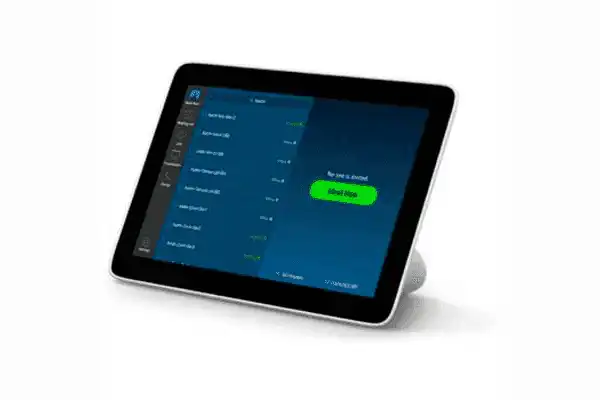
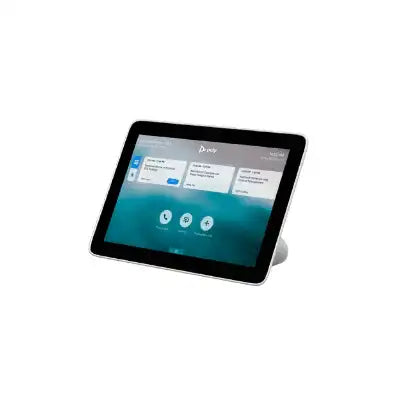
The Poly TC8 touch controller is an 8-inch PoE touch panel that gives a conference room a dedicated tap-to-join control surface for HP Poly room systems. It connects to a Poly Studio X family video bar or a Poly G7500 codec over a single RJ-45 run, handling meeting start, mute, volume, content share, and camera control from the table. Power over Ethernet compatible with IEEE 802.3af class 3 keeps the installation to one cable, which is why integrators specify it in rooms where a table drop is the only service available. The interface follows the platform running on the host system, so operators see the same one-touch join experience across Microsoft Teams Rooms and Zoom Rooms deployments.
Product Description

The TC8 is the controller-only component of a Poly room system — it does not run the meeting itself, it drives the video bar or codec that does. That makes it a straightforward device to specify at design stage and a simple one to cable at rough-in. One Cat 6 drop to the table grommet or floor box carries data and power together, drawn from a switch port supporting PoE per IEEE 802.3af class 3. Because 802.3af class 3 is a lighter draw than the 802.3at class 0 the larger TC10 expects, the TC8 often fits on an existing edge switch that is already close to its PoE ceiling from access points and IP cameras. Confirm the budget on the switch serving the room, not just the free port count, before committing the design.

The 8-inch IPS display runs 1280 x 800 in a 16:10 aspect ratio with 75-degree horizontal and vertical viewing angles, which keeps the calendar and call controls legible for participants seated to either side of the panel. The unit ships with its integrated table stand, an RJ-45 cable, and the quick start guide; wall mounting is supported using the separate HP Poly TC8 wall mount accessory, so decide the mount early and locate the drop accordingly. A Kensington lock slot is provided for open or shared spaces where the controller stays on the table unattended. At 205 x 123 x 79 mm and 812 g it occupies a small footprint at the head of the table without obstructing sightlines to the display.
The TC8 attaches to the Poly Studio X52 video bar and the rest of the Studio X family, including the Studio X50 for medium rooms and the Studio X70 for large rooms, as well as the Poly G7500 modular codec in rooms built around separate cameras and microphones. It is certified with Zoom and Microsoft Teams, and when paired to a Poly Video OS system it also supports native experiences for Zoom Rooms, 8x8, BlueJeans, GoToRoom, Tencent, RingCentral, and DialPad. Where a room needs a larger control surface or an out-of-room scheduling panel with LED availability lights, step up to the Poly TC10 in black or the Poly TC10 in white. For federal and other TAA-required contracts, order the TAA compliant Poly TC8 instead. Firmware, configuration, and device health are managed through Poly Lens alongside the host video system.
Key Features
- 8-Inch IPS Touch Display — A 1280 x 800 panel in 16:10 gives room users a legible control surface for calendar, call, and content controls without dominating the table.
- Single-Cable PoE Installation — One RJ-45 run carries data and power to the controller, so the table position needs a network drop rather than a drop and an outlet.
- 802.3af Class 3 Power Draw — The lighter PoE class often fits an existing edge switch that could not absorb an 802.3at device without a budget upgrade.
- 75-Degree Viewing Angles — Horizontal and vertical viewing angles keep the interface readable for participants seated on either side of the panel.
- Consistent Platform Interface — The control experience follows the platform running on the host system, so users see the same tap-to-join workflow across Teams Rooms and Zoom Rooms.
- Certified with Zoom and Microsoft Teams — Platform certification means the controller is supported rather than merely functional on the two most common enterprise platforms.
- Kensington Lock Slot — Provides physical security for controllers left on the table in open, shared, or public-facing meeting spaces.
- Compact Table Footprint — At 205 x 123 x 79 mm and 812 g the controller sits at the head of the table without blocking the sightline to the display.
- Poly Lens Management — Firmware and configuration are handled centrally alongside the host codec or video bar, which matters across a multi-room estate.
Typical Applications
- Conference room
- Boardroom
- Huddle room
- Training room
- Commercial meeting space
- Multi-purpose room
- Government space
Technical Specifications
| Manufacturer Part Number | 875J0AA#ABA |
| Device Type | In-room touch controller for Poly room systems |
| Display | 8 in. (20.3 cm) diagonal IPS touch display |
| Resolution | WXGA 1280 x 800 |
| Aspect Ratio | 16:10 |
| Viewing Angle | 75° horizontal and vertical |
| Ports | 1x RJ-45 |
| Power | Power over Ethernet (PoE), compatible with IEEE 802.3af class 3 |
| Physical Security | Standard Kensington lock slot |
| Compatible Systems | Poly Studio X family video bars; Poly G7500 codec |
| Platform Certification | Certified with Zoom and Microsoft Teams |
| Native App Support | Zoom Rooms, 8x8, BlueJeans, GoToRoom, Tencent, RingCentral, DialPad when paired to Poly Video OS systems |
| Management | Poly Lens |
| Dimensions | 205 x 123 x 79 mm (8.07 x 4.84 x 3.11 in.) |
| Weight | 812 g (1.79 lb) |
| Color | White |
| Operating Temperature | 0 to 40 °C (32 to 104 °F) |
| Operating Altitude | Up to 3,048 m (10,000 ft) |
| In the Box | Poly TC8, RJ-45 cable, warranty card, quick start guide |
| Warranty | Poly standard one-year limited warranty |
Frequently Asked Questions
Which room systems does the Poly TC8 work with?
HP Poly publishes compatibility with the Poly Studio X family of video bars and the Poly G7500 modular codec, which covers Studio X30, X50, X52, and X70 installations as well as G7500 rooms using separate cameras and microphones. The TC8 is a controller only — it does not host the meeting and cannot be deployed without a compatible Poly room system.
What does the TC8 need from the network switch?
One RJ-45 port supplying Power over Ethernet compatible with IEEE 802.3af class 3. Check the PoE budget on the switch serving the room rather than the free port count: an edge switch already powering wireless access points and IP cameras can be closer to its power ceiling than it looks. The lighter 802.3af class 3 draw is one reason the TC8 fits installs where an 802.3at controller would force a switch upgrade.
How is the TC8 cabled and mounted?
A single Cat 6 drop to the table grommet or floor box carries both data and power, and the controller ships with an integrated table stand plus an RJ-45 cable. Wall mounting is supported with the separate HP Poly TC8 wall mount accessory. Fix the mount decision before rough-in so the drop terminates in the right place — relocating a table drop after the millwork is installed is the expensive version of this decision.
Should I specify the TC8 or the TC10?
The TC8 is an 8-inch in-room controller on 802.3af class 3 power. The TC10 has a larger 10.1-inch display, doubles as an out-of-room scheduling panel with multi-color LED availability lights, ships with wall and table mounting hardware in the box, and expects 802.3at class 0. Choose the TC8 when in-room control is the whole requirement and switch power is constrained; choose the TC10 when the room also needs a scheduling display.
Does the same TC8 work across Microsoft Teams and Zoom rooms?
Yes. The TC8 is certified with Zoom and Microsoft Teams, and the interface follows the platform running on the host system. Organizations running mixed platforms can standardize on one controller part number across the estate rather than stocking a separate control surface per platform.
How is the TC8 managed across multiple rooms?
Firmware, configuration, and device health are handled in Poly Lens alongside the host video bar or codec, so a facilities or IT team monitors the controller as part of the room rather than as a separate endpoint.
Is there a TAA compliant version for federal contracts?
Yes. Order the TAA compliant Poly TC8 for U.S. federal procurement and any contract carrying Trade Agreements Act sourcing requirements. Confirm the exact build against your solicitation before the order is placed.
What warranty and support are included?
The TC8 carries the Poly standard one-year limited warranty. Poly+ service agreements are sold separately for extended coverage, advance hardware replacement, and technical support. Contact Creation Networks for the appropriate coverage tier and for volume or project pricing.
At Creartion Networks, we do everything we can to create an excellent customer experience. This includes fast shipping and easy returns.
- Most in-stock orders placed Monday-Friday ship within 24-48 hours. General restrictions apply; please see our full shipping policy here.
- We offer a 30-day return policy from the delivery date on many products. Product restrictions apply. Restocking fees for the return of open-box items. Please see our full return policy here for more information.
Nationwide Audiovisual Services, Design, Installation & Support
Creation Networks is a trusted nationwide partner for complete audiovisual solutions — delivering expert AV system sales, professional design, programming, installation, and ongoing support to organizations across the United States.
From Microsoft Teams Rooms and enterprise video conferencing to LED video walls, live streaming production, and hybrid collaboration systems, we provide end-to-end AV integration using premium, certified technology from industry leaders including Crestron, Q-SYS, Shure, Extron, and Absen.
Whether you operate a single location or manage facilities nationwide, Creation Networks ensures your AV systems are designed for reliability, scalability, security, and long-term performance — helping your organization communicate more effectively and operate at peak efficiency.
CREATION NETWORKS — A PARTNER YOU CAN TRUST SINCE 2006


