



INOGENI CAM230 HDMI/USB 3.0 Camera Switcher (TAA)

INOGENI CAM230 HDMI/USB 3.0 Camera Switcher (TAA) is backordered and will ship as soon as it is back in stock.
Shipping Availability*
Shipping Availability*
Free Ground Shipping on Most Orders Over $250.00
Looking for the best price or expert advice? Give us a call at 1-888-230-3661 or use the Live Chat below. Buying 1 or 100, you may qualify for greater savings beyond the advertised price.

INOGENI CAM230 HDMI/USB 3.0 Camera Switcher (TAA)
Product Overview
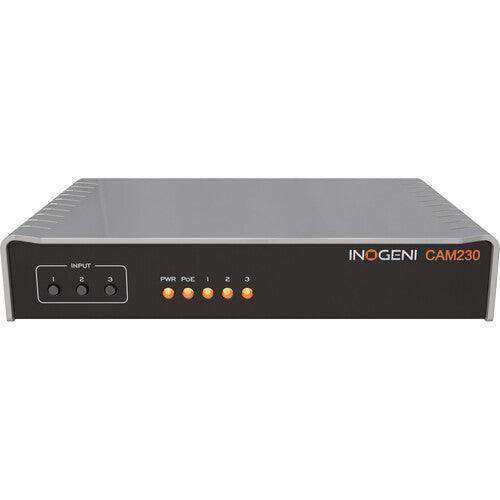
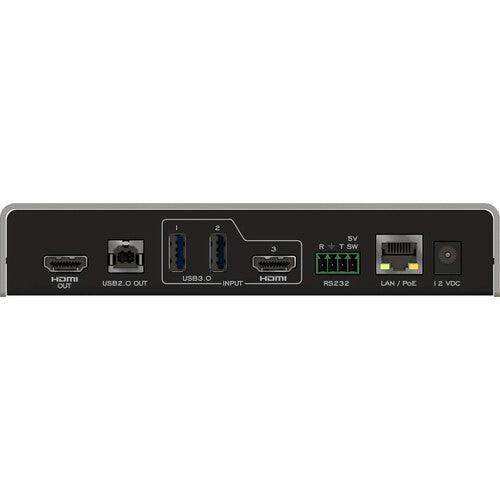
The INOGENI CAM230 is a 3-input USB and HDMI multi-camera switcher designed to improve meeting equity in hybrid conference rooms, classrooms, and collaborative spaces. It accepts two USB 3.0/2.0 cameras and one HDMI camera, consolidating them into a single USB 2.0 MJPEG output (1080p30 with PTZ control) and a simultaneous HDMI 1.4 output (up to 4K30 with embedded audio) for CODECs, matrix switchers, or room displays. Winner of four awards at ISE 2023 and InfoComm 2023, the CAM230 is a driver-free USB HDMI camera switcher compatible with Microsoft Teams, Zoom, Webex, Google Meet, Q-SYS Core processors, Barco ClickShare Conference, and Logitech UC CODECs. Designed and manufactured in Canada, it is TAA-compliant with a 5-year warranty for units purchased after August 1, 2024.
Product Description
The CAM230 multi-camera switcher addresses the challenge of running multiple room cameras — front-of-room PTZ, whiteboard, document camera, or videobar — through a single USB or HDMI output to a conferencing system. Its three-input architecture connects two USB 3.0/2.0 cameras and one HDMI camera, presenting the selected source as a single UVC MJPEG 1080p30 USB stream and simultaneously as an HDMI 1.4 signal at up to 4K30. This dual-output design allows the CAM230 to serve both BYOM laptop users (via USB) and permanent room systems such as Crestron, Logitech Rally Bar, or Poly CODECs (via HDMI) from the same hardware. Camera switching is controlled via RS-232, IP, or the front-panel push button, and the CAM230 is also operable from a videoconferencing control pad, making it straightforward for participants to manage camera selection without dedicated AV support. The CAM230 supports bidirectional audio for videobars from Cisco, Poly, Logitech, and Bose. Hardware-based color space conversion, automatic scaling, and frame rate conversion handle source format differences at the device level. PoE LAN simplifies installation in locations where a separate power run is impractical. Multiple mounting options and visual LED status indicators support rack-adjacent or furniture-mounted installations. The CAM230 also integrates with the Nureva audioconferencing system and has been validated in a Nureva + Sony + CAM230 multi-vendor ecosystem deployment. Compatible with Q-SYS Core processors via the INOGENI plugin for Q-SYS Designer software, and with Barco ClickShare Conference (CX-20, CX-30, CX-50).
Key Features
- 3x1 USB/HDMI Camera Switcher — Selects one of three sources (2x USB 3.0/2.0, 1x HDMI 1080p60) and routes it to simultaneous USB 2.0 MJPEG and HDMI 1.4 outputs.
- Dual Output for BYOM and Fixed Room Systems — USB 2.0 MJPEG 1080p30 output for laptop-connected soft codecs; HDMI 1.4 up to 4K30 output for CODECs, matrix switchers, or room monitors, both active simultaneously.
- UVC MJPEG 1080p30 High-Quality Video — USB output delivers MJPEG-compressed 1080p30 with full PTZ control passthrough over the USB connection.
- No Driver Required — UVC-compliant; recognized as a standard USB camera on Windows, macOS, and Linux without driver installation.
- RS-232 and IP Control — Switchable via RS-232, IP, front-panel button, or videoconferencing control pad; PoE LAN eliminates separate power requirements.
- Bidirectional AEC Audio — Supports bidirectional audio system AEC for videobars from Cisco, Poly, Logitech, and Bose.
- Hardware Video Processing — Hardware-based color space conversion, automatic scaling, and frame rate conversion for clean switching between sources of different formats.
- Whiteboard and Document Camera Support — Accepts USB and HDMI document cameras and whiteboard cameras in addition to PTZ cameras.
- Q-SYS, Barco ClickShare, and Nureva Compatible — Certified for Q-SYS Core processors, Barco ClickShare Conference, and validated in Nureva + Sony multi-vendor deployments.
- TAA-Compliant, 5-Year Warranty — Made in Canada; TAA-compliant; 5-year warranty on units purchased after August 1, 2024.
Typical Applications
- Conference room
- Boardroom
- Huddle room
- Training room
- All-hands room
- Government space
- Commercial meeting space
- Auditorium
Technical Specifications
| Specification | Value |
|---|---|
| Video Inputs | 2x USB 3.0/2.0 (MJPEG or uncompressed); 1x HDMI (1080p60) |
| Video Output — USB | 1x USB 2.0 MJPEG — 1080p30 with PTZ control |
| Video Output — HDMI | 1x HDMI 1.4 up to 4K30 with embedded audio |
| USB Output Codec | UVC MJPEG 1080p30 |
| PTZ Control | Supported over USB output connection |
| Audio | Embedded in USB and HDMI; bidirectional AEC for Cisco, Poly, Logitech, Bose videobars |
| Control Interfaces | RS-232, IP (PoE LAN), front-panel push button, videoconferencing control pad |
| Power | PoE LAN (Power over Ethernet); multiple mounting options |
| Visual Indicators | LED status indicators |
| Hardware Video Processing | Color space conversion, automatic scaling, frame rate conversion |
| Operating Systems | Windows, macOS, Linux; no driver required (UVC-compliant) |
| Compatible UC Systems | Microsoft Teams, Zoom, Webex, Google Meet; Q-SYS Core; Barco ClickShare Conference CX-20/CX-30/CX-50; Nureva |
| Compatible Cameras | Logitech Rally series, MeetUp, Scribe; Vaddio, Huddly, HuddleCamHD, AVer, Jabra, Marshall |
| Logitech CODEC Compatibility | Rally Bar series (Appliance Mode), Roommate, for MTR and Zoom Rooms |
| Enclosure | Aluminium; compact form factor |
| Certifications | TAA-compliant; FCC, CE, RoHS |
| Warranty | 5 years (purchases after Aug 1, 2024); 2 years (purchases before Aug 1, 2024) |
| Country of Origin | Canada |
Frequently Asked Questions
Q: Does the CAM230 require driver installation?
A: No. The CAM230 is a UVC-compliant device and is recognized as a standard USB camera by Windows, macOS, and Linux without driver installation. It works immediately with any application that supports a standard USB camera.
Q: Can the CAM230 output to both a USB soft codec and an HDMI room system simultaneously?
A: Yes. The CAM230 provides simultaneous USB 2.0 MJPEG 1080p30 output (for a laptop soft codec) and HDMI 1.4 output at up to 4K30 (for a CODEC, matrix switcher, or room display). Both outputs are active at the same time from the selected camera source.
Q: What camera types are supported on the USB inputs?
A: The two USB inputs accept USB 3.0/2.0 cameras, including those outputting MJPEG or uncompressed video. Compatible brands include Logitech (Rally, MeetUp, Scribe), Vaddio, Huddly, HuddleCamHD, AVer, Jabra, and Marshall. Whiteboard and document cameras are also supported.
Q: How is the CAM230 powered in a typical installation?
A: The CAM230 supports Power over Ethernet (PoE LAN), allowing it to be powered directly from a PoE-capable network switch without a separate power supply run. This simplifies installation in ceiling mounts, wall mounts, or other locations where power outlets are not immediately available.
Q: Can participants switch cameras without AV support staff?
A: Yes. The CAM230 can be switched via the front-panel push button or via a connected videoconferencing control pad (such as a Teams Rooms or Zoom Rooms controller), allowing meeting facilitators to manage camera selection directly from the room’s existing control interface.
Q: How does the CAM230 handle audio from videobars?
A: The CAM230 supports bidirectional audio system AEC (Acoustic Echo Cancellation) for videobars from Cisco, Poly, Logitech, and Bose. Audio is embedded in both the USB and HDMI outputs and is configurable through the INOGENI Control App.
Q: Is the CAM230 TAA-compliant for government or education procurement?
A: Yes. The CAM230 is manufactured in Canada and is TAA-compliant, making it suitable for U.S. federal government and federally-funded education procurement.
Q: What is the warranty on the CAM230?
A: Units purchased by the end user after August 1, 2024 carry a 5-year warranty. Units purchased before that date carry a 2-year warranty. Contact Creation Networks for warranty registration and support information.
At Creartion Networks, we do everything we can to create an excellent customer experience. This includes fast shipping and easy returns.
- Most in-stock orders placed Monday-Friday ship within 24-48 hours. General restrictions apply; please see our full shipping policy here.
- We offer a 30-day return policy from the delivery date on many products. Product restrictions apply. Restocking fees for the return of open-box items. Please see our full return policy here for more information.
Nationwide Audiovisual Services, Design, Installation & Support
Creation Networks is a trusted nationwide partner for complete audiovisual solutions — delivering expert AV system sales, professional design, programming, installation, and ongoing support to organizations across the United States.
From Microsoft Teams Rooms and enterprise video conferencing to LED video walls, live streaming production, and hybrid collaboration systems, we provide end-to-end AV integration using premium, certified technology from industry leaders including Crestron, Q-SYS, Shure, Extron, and Absen.
Whether you operate a single location or manage facilities nationwide, Creation Networks ensures your AV systems are designed for reliability, scalability, security, and long-term performance — helping your organization communicate more effectively and operate at peak efficiency.
CREATION NETWORKS — A PARTNER YOU CAN TRUST SINCE 2006


