
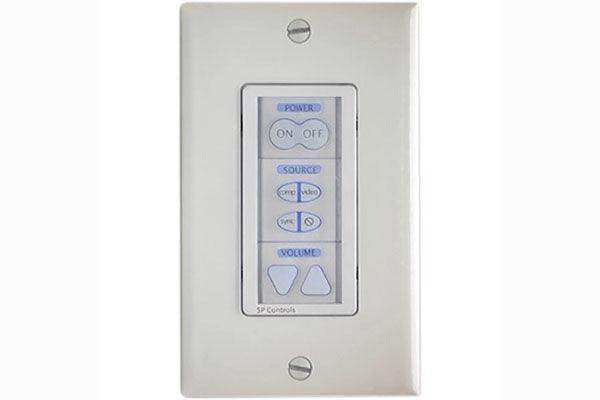

Epson ELPSP10 – PixiePlus Wall Projector Control System

Epson ELPSP10 – PixiePlus Wall Projector Control System is backordered and will ship as soon as it is back in stock.
Shipping Availability*
Shipping Availability*
Free Ground Shipping on Most Orders Over $250.00
Looking for the best price or expert advice? Give us a call at 1-888-230-3661 or use the Live Chat below. Buying 1 or 100, you may qualify for greater savings beyond the advertised price.


Epson ELPSP10 – PixiePlus Wall Projector Control System
Product Overview
The Epson ELPSP10 PixiePlus is a single-gang wall control system that manages an Epson projector and its connected AV sources from one backlit panel. It controls compatible projectors over RS-232 and operates AV devices using IR commands, consolidating power, source selection, and volume into a fixed wall plate so remotes never go missing. The PixiePlus projector controller ships with standard RS-232 control codes for Epson projectors pre-installed and mounts in a standard single-gang back box. It is a practical AV control solution for classrooms and meeting rooms that need locked-down, predictable operation.
Product Description

The PixiePlus is configured to provide power, source selection, and volume control of any compatible Epson projector through RS-232, while its IR codes drive connected AV devices such as source players. The sleek backlit panel installs in any standard single-gang wall box and is designed for use with a Leviton Decora wall plate, so it integrates cleanly into a room's existing electrical finish. Because the standard RS-232 codes for Epson projectors come pre-installed, basic projector control works out of the box. The modular button interface and IR device codes can be reconfigured, and changing the RS-232 commands assigned to each button is done with the SP Controls Programming Wand, sold separately. An automatic projector shutdown timer helps conserve lamp or laser hours and energy, and an installer-set security code prevents unauthorized use in open rooms. This makes the PixiePlus well suited to wall-controlled installations where a full control processor would be overkill. For a compatible Epson display, browse the Epson projector lineup. Pair it with an Epson interactive or classroom projector for a fixed, remote-free control point.
Key Features
- RS-232 projector control — Manages power, source selection, and volume on any compatible Epson projector over RS-232.
- IR device control — Operates connected AV devices using IR command codes.
- Pre-installed Epson codes — Ships with standard RS-232 control codes for Epson projectors already loaded.
- Single-gang wall mount — Backlit panel installs in a standard single-gang back box and suits a Leviton Decora wall plate.
- Reconfigurable buttons — The modular button interface and IR codes can be changed; RS-232 button commands are edited with the optional SP Controls Programming Wand.
- Automatic shutdown timer — Powers the projector down automatically to save energy and light-source hours.
- Security code — An installer-defined code prevents unauthorized operation.
Typical Applications
- Classrooms needing a fixed, remote-free projector control point
- Meeting and training rooms with simple source and volume control
- Shared spaces requiring access control via a security code
- Installations where lost remotes are a recurring problem
Technical Specifications
| Type | Single-gang wall control system (PixiePlus) |
| Projector control | RS-232 (power, source, volume) |
| Device control | IR command codes for AV devices |
| Pre-loaded codes | Standard RS-232 codes for Epson projectors |
| Mounting | Standard single-gang back box; Leviton Decora wall plate (not included) |
| Programming | SP Controls Programming Wand (PXE-PGM-TOOL) required to edit RS-232 button commands; sold separately |
| Additional functions | Automatic projector shutdown timer, user-set security code |
| Model / SKU | ELPSP10 |
Specifications sourced from Epson's official documentation.
Frequently Asked Questions
Which projectors does the PixiePlus control?
It controls any compatible Epson projector with RS-232, and it ships with the standard Epson RS-232 control codes pre-installed.
How does it control non-projector AV devices?
The PixiePlus uses IR command codes to operate connected AV devices in addition to its RS-232 projector control.
What is needed to install it?
It mounts in a standard single-gang back box and is designed for a Leviton Decora wall plate, which is not included.
Can I reprogram the buttons?
Yes. The modular button interface and IR codes can be reconfigured, and editing the RS-232 commands assigned to each button requires the SP Controls Programming Wand, sold separately.
Does it help save energy?
An automatic projector shutdown timer powers the projector down to conserve energy and light-source hours.
Can I restrict who uses it?
Yes. An installer-defined security code prevents unauthorized operation in open or shared rooms.
At Creartion Networks, we do everything we can to create an excellent customer experience. This includes fast shipping and easy returns.
- Most in-stock orders placed Monday-Friday ship within 24-48 hours. General restrictions apply; please see our full shipping policy here.
- We offer a 30-day return policy from the delivery date on many products. Product restrictions apply. Restocking fees for the return of open-box items. Please see our full return policy here for more information.
Nationwide Audiovisual Services, Design, Installation & Support
Creation Networks is a trusted nationwide partner for complete audiovisual solutions — delivering expert AV system sales, professional design, programming, installation, and ongoing support to organizations across the United States.
From Microsoft Teams Rooms and enterprise video conferencing to LED video walls, live streaming production, and hybrid collaboration systems, we provide end-to-end AV integration using premium, certified technology from industry leaders including Crestron, Q-SYS, Shure, Extron, and Absen.
Whether you operate a single location or manage facilities nationwide, Creation Networks ensures your AV systems are designed for reliability, scalability, security, and long-term performance — helping your organization communicate more effectively and operate at peak efficiency.
CREATION NETWORKS — A PARTNER YOU CAN TRUST SINCE 2006


