

Crestron UC-ENGINE-BRKT-T-UPGRD Flex Medium Room Upgrade Solution with Microsoft Teams® Rooms

Crestron UC-ENGINE-BRKT-T-UPGRD Flex Medium Room Upgrade Solution with Microsoft Teams® Rooms is backordered and will ship as soon as it is back in stock.
Shipping Availability*
Shipping Availability*
Free Ground Shipping on Most Orders Over $250.00
Looking for the best price or expert advice? Give us a call at 1-888-230-3661 or use the Live Chat below. Buying 1 or 100, you may qualify for greater savings beyond the advertised price.


Crestron UC-ENGINE-BRKT-T-UPGRD Flex Medium Room Upgrade Solution w...
Crestron UC-ENGINE-BRKT-T-UPGRD – Flex Medium Room Upgrade Solution for Microsoft Teams Rooms

Product Overview
The Crestron UC-ENGINE-BRKT-T-UPGRD is an upgrade solution providing all necessary components to upgrade a deployed Crestron Flex tabletop conference device (CCS-UC series) to a Microsoft Teams Rooms certified medium room system. It enables organizations with existing Crestron Flex tabletop devices to upgrade to a full Teams Rooms deployment by replacing the compute module and touch controller while retaining the existing peripheral infrastructure, significantly reducing the cost and disruption of a full system replacement.
Key Features
- Upgrade Path for Existing Crestron Flex Systems: Provides the new MTR compute and touch controller to upgrade an existing CCS-UC series tabletop device to Microsoft Teams Rooms without replacing the entire conference system.
- Reduced Upgrade Cost: Retains existing peripheral infrastructure — only upgrades the compute and controller components.
- Microsoft Teams Rooms Certified: Results in a complete certified MTR medium room system after upgrade.
- XiO Cloud Management: Upgraded system enrolled in XiO Cloud for centralized fleet management.
Typical Applications
- Upgrade of existing Crestron Flex CCS-UC tabletop conference room devices to Microsoft Teams Rooms certification
- Enterprise AV fleet MTR migration using upgrade kits to reduce per-room upgrade cost vs. full system replacement
- Conference room refresh program prioritizing software platform upgrade over hardware replacement
Technical Specifications
| Model | UC-ENGINE-BRKT-T-UPGRD |
| Platform | Microsoft Teams Rooms (upgrade) |
| Compatible With | Existing Crestron Flex CCS-UC series tabletop devices |
| Room Size | Medium |
| Management | Crestron XiO Cloud |
| SKU | UC-ENGINE-BRKT-T-UPGRD |
Competitor comparison: not applicable for this product.
Frequently Asked Questions
Which Crestron Flex devices is UC-ENGINE-BRKT-T-UPGRD compatible with?
Compatible with CCS-UC series deployed Crestron Flex tabletop conference devices. Contact Creation Networks for compatibility confirmation for your specific existing device models.
What is the warranty?
Crestron provides a standard 3-year limited warranty. Contact Creation Networks.
Crestron UC Engine part numbers explained
A Crestron UC Engine is the purpose-built Intel Core mini PC that runs the native conferencing platform at the heart of a Crestron Flex room. It ships preloaded and locked to a certified room platform — Microsoft Teams Rooms or Zoom Rooms — mounts on a UC Bracket Assembly on the wall or on the back of a VESA-compliant display, and is provisioned and monitored centrally through Crestron XiO Cloud. The UC Engine is what actually joins the meeting; the tabletop device is the touch controller and the camera, microphones and displays are peripherals around it.
The part numbers ending in -UPGRD are upgrade kits, not standalone engines. Each one supplies a new UC Engine already fitted to a bracket assembly, plus the converters and cables needed to convert an already-deployed Crestron Flex tabletop conference device into a complete certified room system. Three things distinguish them: the platform (-T- for Microsoft Teams Rooms, -Z- for Zoom Rooms), whether the kit is standard (BRKT) or advanced (BRKTX) — BRKTX adds bring-your-own-device presentation — and whether it is the TAA-compliant Government Version (-GV).
| Part number | Platform | Standard or advanced | UC Bracket Assembly included | TAA Government Version |
|---|---|---|---|---|
| UC-ENGINE-BRKT-T-UPGRD (this product) | Microsoft Teams Rooms | Standard — native Teams Rooms only | UC-BRKT-200-S-T-ASSY | No |
| UC-ENGINE-BRKTX-T-UPGRD | Microsoft Teams Rooms | Advanced — adds BYOD, guests can present and call from their own laptop platform | UC-BRKT-260-P-T-ASSY | No |
| UC-ENGINE-BRKT-T-UPGRD-BRKTX | Microsoft Teams Rooms | Standard to advanced — adds BYOD and includes the UC-PR UC Presentation Transmitter | UC-BRKT-260-P-T-ASSY | No |
| UC-ENGINE-BRKT-T-UPGRD-GV | Microsoft Teams Rooms | Standard — native Teams Rooms only | UC-BRKT-200-S-T-ASSY | Yes — TAA compliant, suitable for government deployments |
| UC-ENGINE-BRKTX-T-UPGRD-GV | Microsoft Teams Rooms | Advanced — adds BYOD | UC-BRKT-260-P-T-ASSY | Yes — TAA compliant, suitable for government deployments |
| UC-ENGINE-BRKT-Z-UPGRD | Zoom Rooms | Standard — native Zoom Rooms only | UC-BRKT-200-S-Z-ASSY | No |
| UC-ENGINE-BRKTX-Z-UPGRD | Zoom Rooms | Advanced — adds BYOD | UC-BRKT-260-P-Z-ASSY | No |
| UC-ENGINE-BRKT-Z-UPGRD-BRKTX | Zoom Rooms | Standard to advanced — adds BYOD and includes the UC-PR UC Presentation Transmitter | UC-BRKT-260-P-Z-ASSY | No |
| UC-ENGINE-BRKTX-PRO-Z-UPGRD | Zoom Rooms | Advanced PRO — adds BYOD, built around the UC-CX100-PRO-Z | UC-BRKT-260-PRO-Z-ASSY | No |
All UC-ENGINE upgrade kits above are stocked by Creation Networks. Follow any part number for current pricing, lead time and full detail, or browse the complete Crestron AV Solutions range.
Which UC Engine do I need?
Work from the Crestron Flex hardware you already have in the room, then from how the room is used:
- You have a Crestron Flex tabletop device (CCS-UC-1, CCS-UC-1-AV or CCS-UC-1-AV-PLUS) and you want native Microsoft Teams Rooms, nothing else. This product — UC-ENGINE-BRKT-T-UPGRD — is the correct kit. It includes the UC-BRKT-200-S-T-ASSY bracket assembly and every cable required.
- Same hardware, but you also want visitors to present and run their own Zoom, Webex or Google Meet call from a laptop. You need an advanced kit with BYOD: UC-ENGINE-BRKTX-T-UPGRD for Teams Rooms, or UC-ENGINE-BRKTX-Z-UPGRD for Zoom Rooms.
- You are moving a standard UC-B, UC-MM or UC-C series room up to an advanced BYOD room and need the presentation transmitter as well. Specify UC-ENGINE-BRKT-T-UPGRD-BRKTX (Teams Rooms) or UC-ENGINE-BRKT-Z-UPGRD-BRKTX (Zoom Rooms) — these bundle the UC-PR UC Presentation Transmitter.
- Your room standard is Zoom Rooms, not Teams Rooms. Do not order a -T- kit. The direct equivalent of this product is UC-ENGINE-BRKT-Z-UPGRD.
- You are procuring for a federal agency or a contract with TAA requirements. Order the Government Version: UC-ENGINE-BRKT-T-UPGRD-GV (standard) or UC-ENGINE-BRKTX-T-UPGRD-GV (advanced with BYOD).
- You need the UC Engine bracket assembly in an equipment rack rather than behind the display. Add the UCA-RMK-1U 1U rack mount kit for the UC Engine bracket assembly.
Key Specifications — UC-ENGINE-BRKT-T-UPGRD
| Specification | Detail |
|---|---|
| Part number | UC-ENGINE-BRKT-T-UPGRD |
| Conferencing platform | Native Microsoft Teams Rooms software with one-touch meeting join |
| UC Engine | UC-ENGINE-S-T — Intel Core processor running Windows 11 IoT Edition |
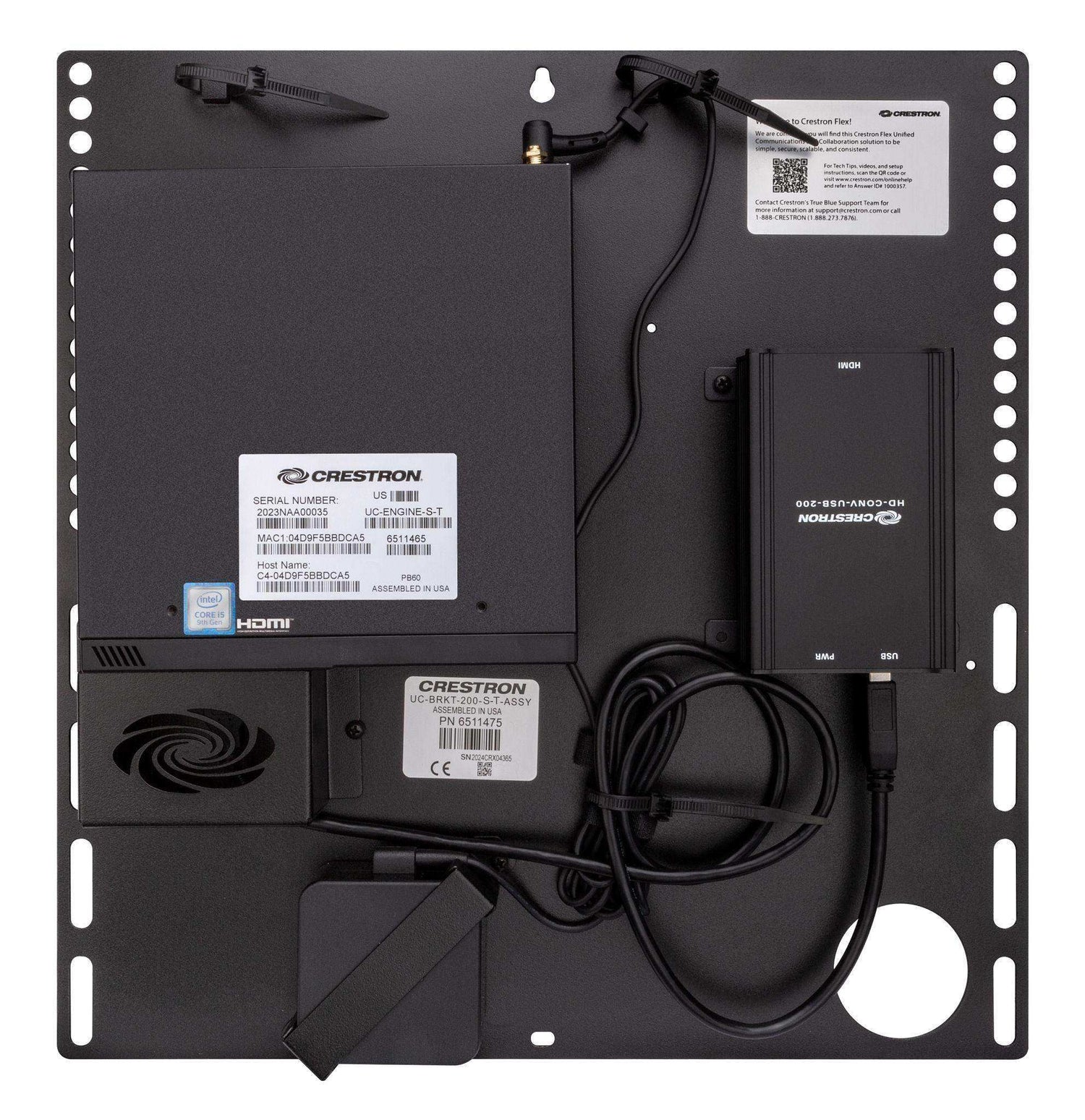
| Bracket assembly | UC-BRKT-200-S-T-ASSY, supplied preassembled |
| Display support | Single or dual video displays (displays not included); 1080p display resolution |
| Content ingest | HDMI input via the included HDMI to USB 3.0 converter |
| Network | 100/1000 Mbps Ethernet |
| Power | 100–240 VAC, 50/60 Hz power adapter included |
| Construction | Black metal mounting bracket |
| Mounting | Wall mount, or attach to the rear of a VESA-compliant display |
| Dimensions (bracket assembly) | 15.00 in. (H) x 14.50 in. (W) x 1.87–1.93 in. (D) |
| Management | Crestron XiO Cloud provisioning, monitoring and network alerts (subscription required) |
What is physically in the kit
Per Crestron's specifications for UC-ENGINE-BRKT-T-UPGRD, the box contains:
-
UC-BRKT-200-S-T-ASSY UC Bracket Assembly (1), preassembled and comprising:
- UC-ENGINE-S-T UC Engine (1)
- ADPT-USB-ENET USB-to-Ethernet adapter (1)
- HDMI to USB 3.0 content ingest converter (1)
- Mounting hardware kit (1)
- DisplayPort to HDMI cable, 6 ft (1) — for the secondary display
- HDMI cable, 6 ft (1) — primary display
- HDMI cable, 20 ft (1) — content sharing
- USB extension cable, 15 ft (1)
- Ethernet CAT5e cable, 7 ft (1)
- Ethernet CAT6a cable, 20 ft (1)
- Power adapter (1)
Displays, camera and the Crestron Flex tabletop conference device are not included — this kit upgrades hardware you already own.
Deployment & Compatibility
- Existing Flex devices it upgrades: CCS-UC-1, CCS-UC-1-AV and CCS-UC-1-AV-PLUS Crestron Flex tabletop conference devices, together with the room camera.
- Microsoft Teams Rooms: the kit runs native Microsoft Teams Rooms software. The Flex tabletop conference device must be configured in Microsoft Teams mode before deployment.
- Zoom Rooms: this -T- part number is the Teams Rooms variant and is not the Zoom kit. For a Zoom Rooms room standard, order UC-ENGINE-BRKT-Z-UPGRD instead.
- Direct connection vs network connection: the conference device can be connected directly to the UC Engine for the simplest deployment, or over the network. Network connection is what enables XiO Cloud management; when using it, disconnect the direct connect adapter from the UC Engine. Only one control device is supported using the direct connection method.
- XiO Cloud: supports provisioning, remote monitoring and network alerts across a fleet of rooms. XiO Cloud service requires a separate subscription.
- Displays: must support Wake on Sync and Sleep on No Sync.
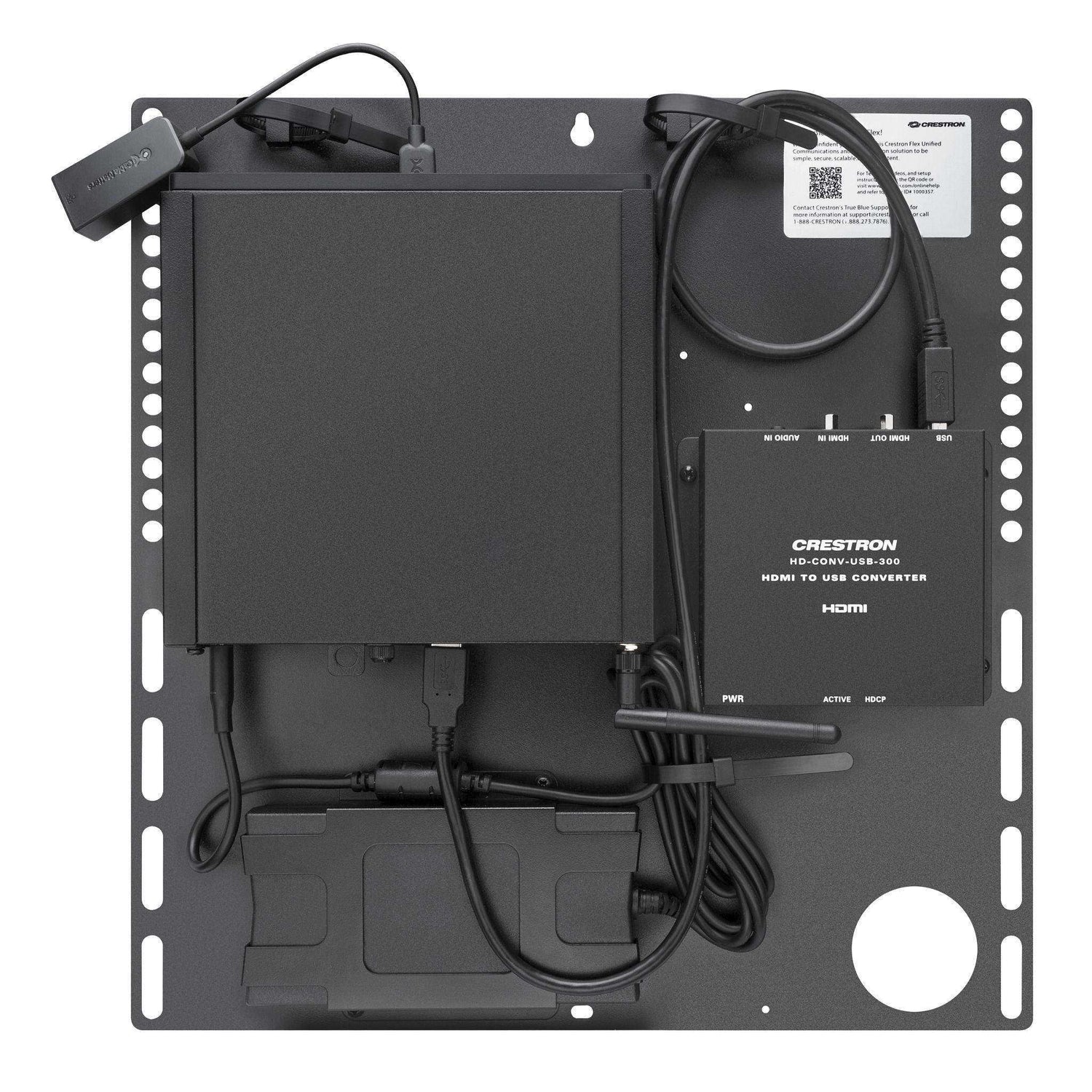
- Laptop content ingest: a laptop connects through an HD-CONV-USB-200 or HD-CONV-USB-300 converter.
- Room control: the UC Engine can be integrated with a Crestron control system for lighting, shades and other room amenities; this requires additional commissioning by a Crestron integrator.
- Rack mounting: use the UCA-RMK-1U 1U rack mount kit to install the UC Engine bracket assembly in a 19-inch rack.
Documentation & Resources
- Crestron UC-ENGINE-BRKT-T-UPGRD specification sheet
- Crestron installation and connection guide — UC-ENGINE-BRKT-T-UPGRD
- Crestron features reference — BRKT-T-UPGRD, BRKT-T-UPGRD-GV, BRKTX-T-UPGRD and BRKTX-T-UPGRD-GV
Frequently Asked Questions
What is a Crestron UC Engine?
The UC Engine is the compute module in a Crestron Flex room — a purpose-built Intel Core mini PC that runs the certified conferencing platform, drives the displays, ingests content and connects the camera and audio peripherals. It is supplied fitted to a UC Bracket Assembly and is managed through Crestron XiO Cloud. In a Crestron Flex system the UC Engine is the part that actually hosts the meeting.
Is the UC Engine a PC?
Technically yes — it is an Intel Core based mini PC running Windows IoT (Windows 11 IoT Edition on this kit's UC-ENGINE-S-T). It is not a general-purpose office computer, though: it ships preloaded and locked to a certified room platform, it is provisioned and updated centrally through XiO Cloud, and it is not intended to run other desktop applications.
What is the difference between UC-ENGINE-BRKT and UC-ENGINE-BRKTX?
BRKT is the standard kit and includes the UC-BRKT-200-S-T-ASSY bracket assembly; it runs the native room platform only. BRKTX is the advanced kit and includes the UC-BRKT-260-P-T-ASSY bracket assembly, which adds bring-your-own-device support — a visitor can plug in a laptop and present, call and conference on their own UC platform, with the room switching between that and the native platform. If guests routinely need to run their own Zoom, Webex or Google Meet call in the room, choose BRKTX.
Does UC-ENGINE-BRKT-T-UPGRD work with Zoom?
Not as native Zoom Rooms. The -T- suffix means this kit runs Microsoft Teams Rooms. For a native Zoom Rooms upgrade, order UC-ENGINE-BRKT-Z-UPGRD. If you want to keep Teams Rooms as the room standard but still let visitors join Zoom calls from their own laptop, use the BYOD-capable UC-ENGINE-BRKTX-T-UPGRD instead.
Which existing Crestron Flex devices does this kit upgrade?
Crestron lists CCS-UC-1, CCS-UC-1-AV and CCS-UC-1-AV-PLUS tabletop conference devices. The kit reuses your existing tabletop device and camera and supplies the new UC Engine, bracket assembly, converters and cabling.
What does the -GV suffix mean on a UC-ENGINE part number?
GV stands for Government Version. Crestron states that the Government Version is TAA compliant and suitable for government deployments. The hardware configuration otherwise mirrors the commercial kit — UC-ENGINE-BRKT-T-UPGRD-GV includes the same UC-BRKT-200-S-T-ASSY bracket assembly as this product.
How many displays does UC-ENGINE-BRKT-T-UPGRD support?
Single or dual video displays, at 1080p. Displays are not included, and they must support Wake on Sync and Sleep on No Sync.
Do I need XiO Cloud to use this upgrade kit?
The room will function without it, but XiO Cloud is how Crestron Flex rooms are provisioned, monitored and standardised at scale, and it requires the UC Engine to be connected over the network rather than by direct connection. XiO Cloud is a separate subscription. Talk to Creation Networks about enrolling an existing estate.
Related products
- Crestron UC-ENGINE-BRKTX-T-UPGRD — advanced Teams Rooms upgrade with BYOD
- Crestron UC-ENGINE-BRKT-T-UPGRD-BRKTX — standard to advanced Teams Rooms upgrade with BYOD and UC-PR
- Crestron UC-ENGINE-BRKT-T-UPGRD-GV — TAA-compliant Government Version of this kit
- Crestron UC-ENGINE-BRKTX-T-UPGRD-GV — TAA-compliant advanced Teams Rooms upgrade with BYOD
- Crestron UC-ENGINE-BRKT-Z-UPGRD — Zoom Rooms equivalent of this kit
- Crestron UC-ENGINE-BRKTX-Z-UPGRD — advanced Zoom Rooms upgrade with BYOD
- Crestron UC-ENGINE-BRKT-Z-UPGRD-BRKTX — standard to advanced Zoom Rooms upgrade with BYOD and UC-PR
- Crestron UC-ENGINE-BRKTX-PRO-Z-UPGRD — advanced PRO Zoom Rooms upgrade
- Crestron UCA-RMK-1U — 1U rack mount kit for the UC Engine bracket assembly
- Crestron AV Solutions — full Crestron range at Creation Networks
At Creartion Networks, we do everything we can to create an excellent customer experience. This includes fast shipping and easy returns.
- Most in-stock orders placed Monday-Friday ship within 24-48 hours. General restrictions apply; please see our full shipping policy here.
- We offer a 30-day return policy from the delivery date on many products. Product restrictions apply. Restocking fees for the return of open-box items. Please see our full return policy here for more information.
Nationwide Audiovisual Services, Design, Installation & Support
Creation Networks is a trusted nationwide partner for complete audiovisual solutions — delivering expert AV system sales, professional design, programming, installation, and ongoing support to organizations across the United States.
From Microsoft Teams Rooms and enterprise video conferencing to LED video walls, live streaming production, and hybrid collaboration systems, we provide end-to-end AV integration using premium, certified technology from industry leaders including Crestron, Q-SYS, Shure, Extron, and Absen.
Whether you operate a single location or manage facilities nationwide, Creation Networks ensures your AV systems are designed for reliability, scalability, security, and long-term performance — helping your organization communicate more effectively and operate at peak efficiency.
CREATION NETWORKS — A PARTNER YOU CAN TRUST SINCE 2006


