


ScreenBeam 1100 Plus 4K Superior Wireless Display Receiver - SBWD1100P
ScreenBeam 1100 Plus 4K Superior Wireless Display Receiver - SBWD1100P is backordered and will ship as soon as it is back in stock.
Shipping Availability*
Shipping Availability*
Free Ground Shipping on Most Orders Over $250.00
Looking for the best price or expert advice? Give us a call at 1-888-230-3661 or use the Live Chat below. Buying 1 or 100, you may qualify for greater savings beyond the advertised price.

ScreenBeam 1100 Plus 4K Superior Wireless Display Receiver - SBWD1100P
Product Overview
The ScreenBeam 1100 Plus is ScreenBeam's flagship 4K wireless display receiver, purpose-built for enterprise conference rooms, hybrid meeting spaces, and higher education collaboration environments. It delivers app-free wireless presentation from Windows, macOS, iOS, Android, and Chromebook devices using native Miracast, AirPlay, Google Cast, and BrowserCast protocols—no client software, dongle, or cable required. The included ScreenBeam Conference software enables BYOM (Bring Your Own Meeting) conferencing, allowing users to wirelessly control the room's camera, microphone, and speakers for Microsoft Teams, Zoom, or any UC platform of their choice. A three-network architecture isolates guest traffic from corporate infrastructure while CMS Enterprise software provides centralized monitoring and management across multi-site commercial deployments.
Product Description

The ScreenBeam 1100 Plus addresses a core challenge in commercial AV: enabling any device to present wirelessly on the room display without IT intervention, app installs, or proprietary dongles. Deployed in conference rooms, boardrooms, and lecture halls, the 1100 Plus supports simultaneous wireless presentation from up to four devices, and users can switch the active presenter without disconnecting the previous session.
For organizations running Microsoft Teams Rooms or Zoom Rooms, ScreenBeam Conference software integrates the 1100 Plus directly into the existing UC workflow. Users wirelessly connect their laptop and immediately gain control of room peripherals—camera, microphone, and speakers—through their preferred conferencing application. No dedicated room PC or additional hardware is needed for BYOM operation.

The HDMI Input eliminates the need for a separate HDMI switch: wired and wireless sources coexist using a single device. Two independent radios—a 3×3 MIMO for Miracast P2P and local Wi-Fi, and a 2×2 MIMO for network bridge mode—maintain reliable connectivity in dense wireless enterprise environments. VLAN tagging is supported on the wired connection for deployments requiring additional subnet isolation.
GhostInking™ technology eliminates wireless inking lag on connected interactive flat panels, enabling real-time annotation in Microsoft Office 365 applications. Built-in HTML-based digital signage activates on the display when no presentation session is active, turning idle room screens into communication assets without additional hardware or subscriptions. CMS Enterprise supports multi-user, role-based administration with remote firmware deployment, security policy enforcement, device grouping, and PIN pairing customization.

The 1100 Plus supports WPA3 wireless security (SAE, EAP-TLS, Enhanced Open) and IEEE 802.1x authentication for enterprise network compliance. Optional add-ons include the ScreenBeam USB Pro Switch for full BYOM capability in Microsoft Teams Room environments, and the ScreenBeam PoE Adapter for single-cable installation.
Key Features
- App-Free Wireless Presentation — Supports Miracast, AirPlay, Google Cast, and BrowserCast across Windows, macOS, iOS, Android, and Chromebook without requiring any client application installation.
- BYOM Conferencing via ScreenBeam Conference — Wirelessly connects a user's laptop to room AV peripherals, enabling Microsoft Teams, Zoom, or any UC platform to use the room camera, microphone, and speaker system without a dedicated room PC.
- Microsoft Teams Room and Zoom Room Integration — Pairs with existing MTR and Zoom Room deployments via the ScreenBeam USB Pro Switch, allowing UC systems and wireless presentation to share the same room display and peripherals.
- 4K Output at 30 Hz — HDMI output delivers up to 3840×2160 resolution, meeting the display requirements of commercial 4K panels and large-format displays.
- HDMI Input with Pass-Through — Accepts a wired HDMI source, eliminating the need for a separate HDMI matrix or switcher in rooms with both wired and wireless presenters.
- Three-Network Architecture — Maintains simultaneous connections across corporate Wi-Fi (infrastructure bridge), guest Wi-Fi (local mode), and Miracast P2P networks, keeping guest devices isolated without additional VLAN configuration.
- Multi-View — Up to 4 Simultaneous Sources — Up to four client devices can share content on the display at the same time; presenters swap without disconnecting the prior source.
- GhostInking™ Wireless Annotation — Patented low-latency inking technology delivers natural pen-to-display responsiveness on interactive flat panels for Windows users with Microsoft Office 365.
- HTML-Based Digital Signage — Displays externally hosted HTML5-compatible signage content when the room is unoccupied, converting idle screens into communication endpoints without additional hardware.
- CMS Enterprise Management (Included) — Web-based multi-user, role-based central management supports remote configuration, firmware deployment, security policy enforcement, and device health monitoring across all receivers.
- WPA3 Enterprise Security — Supports WPA3-SAE, WPA3 EAP-TLS, WPA3 Enhanced Open, and IEEE 802.1x for enterprise wireless network compliance.
- MultiBeam Content Distribution — Extends wireless or wired content mirroring to up to 8 remote displays over the network for multi-room deployments.
Typical Applications
- Boardroom
- Conference Room
- All-Hands Room
- Government Space
- Commercial Meeting Space
- Multi-Purpose Room
- Training Room
- Auditorium
Technical Specifications
| SKU | SBWD1100P |
| Resolution | Up to 4K (3840×2160) at 30 Hz |
| Video | H.264 Compression |
| Audio | LPCM 2.0 |
| Wireless Protocols | Miracast, AirPlay, Google Cast, BrowserCast |
| Compatible OS | Windows 11/10, macOS 11+, iOS 13+, Android 8+, ChromeOS/Chrome 98+ |
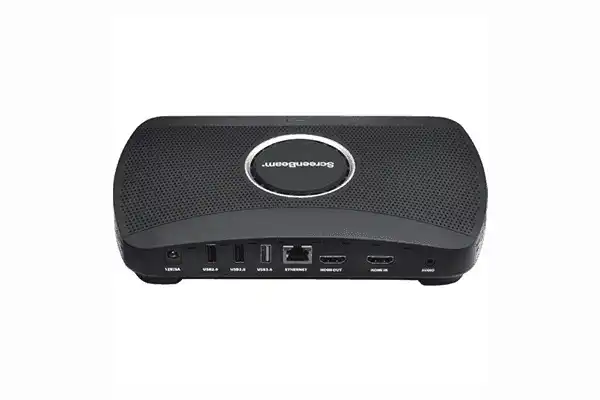
| Interfaces | 1× HDMI Output, 1× HDMI Input, 1× RJ-45 (1 GbE), 1× USB 3.0 Type-A, 2× USB 2.0 Type-A, 1× 3.5mm Analog Audio, 1× DC Power Jack |
| Ethernet | 1000Base-T RJ-45 LAN |
| Wireless P2P / Hotspot | 802.11ac 3×3 MIMO Dual-band 5 GHz |
| Wireless Infrastructure | 802.11ac 2×2 MIMO 2.4 GHz and 5 GHz (DFS) |
| Authentication | IEEE 802.1x, WPA-PSK, WPA2-PSK, WPA3-SAE, PEAP-MSCHAPv2, EAP-TLS |
| Content Protection | HDCP 2.x (Miracast only) |
| Power Input | 12 VDC, 3 A |
| Power Consumption | 8.4 W typical / 24.8 W peak |
| Operating Temperature | 0°–40°C / 32°–104°F |
| Storage Temperature | -20°–85°C / -4°–185°F |
| Operating Humidity | 20–80%, non-condensing |
| Dimensions | 8.66 × 5.66 × 1.47 in (220 × 144 × 37.5 mm) |
| Weight | 1 lb 0 oz (453.5 g) |
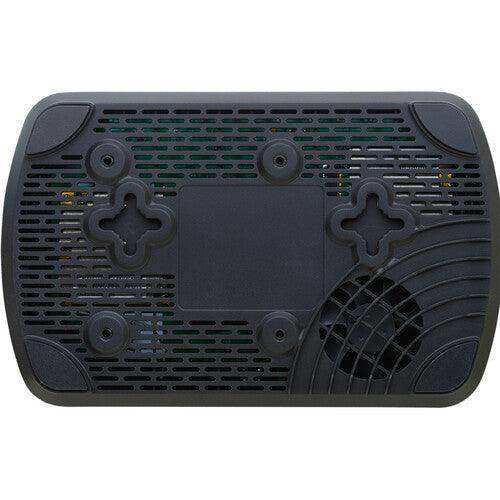
| Mounting | Wall mount, Magnetic mounting kit, VESA 75×75 mm |
| Regulatory | FCC, RED, RoHS, UL |
| Warranty | 3-year limited manufacturer hardware warranty |
Frequently Asked Questions
What devices connect to the ScreenBeam 1100 Plus without a client app?
Windows 11/10, macOS 11+, iOS 13+, Android 8+, and ChromeOS/Chrome 98+ all connect using built-in wireless display protocols. No client software installation is required on user devices.
How does the 1100 Plus integrate with Microsoft Teams Rooms?
When paired with the ScreenBeam USB Pro Switch (sold separately), the 1100 Plus adds BYOM wireless presentation to an existing MTR system. The USB Pro Switch automates AV peripheral switching between the dedicated MTR device and a BYOM laptop session, allowing both modes to share the same camera, microphone, and speakers.
Can wired and wireless sources be active simultaneously?
Yes. The HDMI Input accepts a wired source while the receiver handles wireless connections independently. No separate HDMI switcher is required—the 1100 Plus manages both signal types in a single device.
How does the three-network architecture isolate guest devices?
The receiver maintains three independent network interfaces: corporate Wi-Fi via infrastructure bridge, guest access via local Wi-Fi hotspot, and Miracast P2P. Guest devices connect through local hotspot mode without traversing the corporate network, and no additional VLAN configuration on the room switch is needed.
What does CMS Enterprise provide for IT teams?
CMS Enterprise is a web-based management platform included at no charge. It supports multi-user, role-based access; remote receiver monitoring; firmware batch deployment; security policy configuration; device grouping; and customizable PIN pairing across unlimited receivers.
Is ScreenBeam Conference software included or an add-on?
ScreenBeam Conference is included with the 1100 Plus at no additional charge. It enables BYOM wireless conferencing by connecting a user's laptop to room cameras, microphones, and speakers for Teams, Zoom, or any UC service.
What is the warranty coverage?
ScreenBeam provides a 3-year limited manufacturer hardware warranty for units purchased after January 2, 2022. Contact ScreenBeam support or your authorized reseller for warranty service and RMA procedures.
What mounting options are available?
The 1100 Plus supports wall mounting, a magnetic mounting kit, and VESA 75×75 mm mounting. An optional PoE Adapter is available to power the unit over a single Ethernet cable, eliminating the need for a separate power outlet at the installation point.
At Creation Networks, we do everything we can to create an excellent customer experience. This includes fast shipping and easy returns.
- Most in-stock orders placed Monday-Friday ship within 24-48 hours. General restrictions apply; please see our full shipping policy here.
- We offer a 30-day return policy from the delivery date on many products. Product restrictions apply. Restocking fees for the return of open-box items. Please see our full return policy here for more information.
Nationwide Audiovisual Services, Design, Installation & Support
Creation Networks is a trusted nationwide partner for complete audiovisual solutions — delivering expert AV system sales, professional design, programming, installation, and ongoing support to organizations across the United States.
From Microsoft Teams Rooms and enterprise video conferencing to LED video walls, live streaming production, and hybrid collaboration systems, we provide end-to-end AV integration using premium, certified technology from industry leaders including Crestron, Q-SYS, Shure, Extron, and Absen.
Whether you operate a single location or manage facilities nationwide, Creation Networks ensures your AV systems are designed for reliability, scalability, security, and long-term performance — helping your organization communicate more effectively and operate at peak efficiency.
CREATION NETWORKS — A PARTNER YOU CAN TRUST SINCE 2006


