

Product Questions? Ask Our Experts! 888.230.3661 sales@creationnetworks.net Contact us today for your best package pricing and product availability.

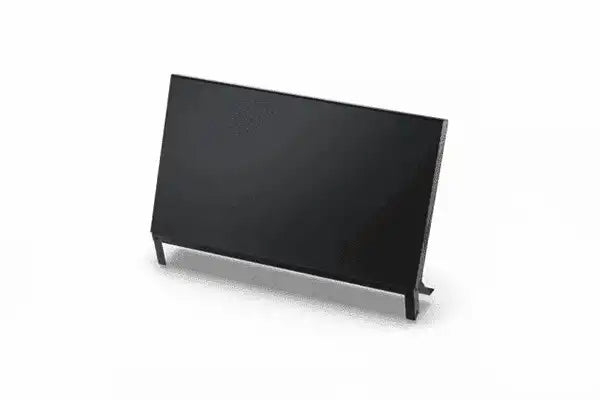
Blackmagic Design Fairlight Console LCD Monitor - DV/RESFA/LCDMCS

Regular price $1,495.00
Shipping calculated at checkout.
Blackmagic Design  |  SKU: DV/RESFA/LCDMCS

Shipping Availability*

Free Ground Shipping on Most Orders Over $250.00

Looking for the best price or expert advice? Give us a call at 1-888-230-3661 or use the Live Chat below. Buying 1 or 100, you may qualify for greater savings beyond the advertised price.

Accepted payment methods

Product Overview

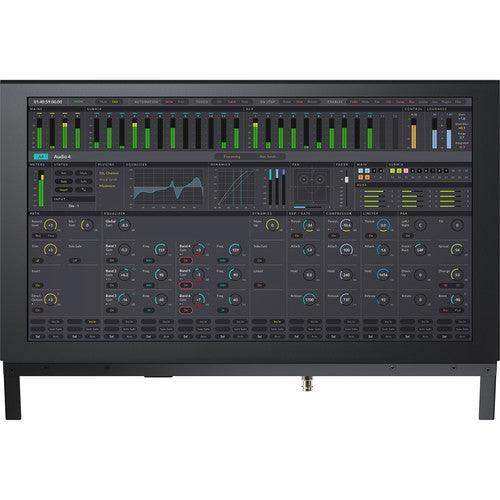
The Blackmagic Design Fairlight Console LCD Monitor equips each bay of a Fairlight console with a self-contained computer and high-resolution display for comprehensive visual referencing in DaVinci Resolve. With Ethernet, HDMI, and SDI connectivity, it accepts signals from a channel control panel, computer, or DeckLink interface, and provides graphical feedback for the panel's controls when paired with a Fairlight channel control.

Key Specs

  • Self-contained LCD with built-in computer running Blackmagic OS
  • Ethernet, HDMI, and 3G-SDI inputs
  • Shows channel feedback, the Resolve UI, or full-screen video
  • One per Fairlight console bay
  • Internal power supply

Product Description

Equip every bay of your Fairlight console with a Blackmagic Design Fairlight Console LCD Monitor to achieve versatile and comprehensive visual referencing for your DaVinci Resolve 17 system. This self-contained computer and high-resolution display combo features Ethernet, HDMI, and SDI connectivity to accept video signal from various sources such as a channel control panel, a computer, and a DeckLink interface.

When configured with a Fairlight channel control panel, the Fairlight Console LCD Monitor provides graphical feedback for the panel's controls, even as you adjust them in real time. Paired with a Fairlight Audio Editor, this LCD monitor will show you the DaVinci Resolve GUI without relying on an additional monitor. Run a video feed from your DeckLink or UltraStudio interface into the BNC SDI input to use the Fairlight Console LCD Monitor for lip sync checks with full-screen video previewing.

Clear Visual Reference
The Fairlight Console LCD Monitor is its own self-contained computer running Blackmagic OS, giving you instant graphic feedback for all channels in its corresponding module. It can display channel information, the DaVinci Resolve user interface, plug-in interfaces, or video previews.


Depending on the task, you'll see individual channel information in-line with each fader strip below, all parameters when used in single-channel mode, or all controls for master mode. Previewing the video program while mixing and editing allows you to see the talent up close; you get a detailed view of character faces for checking lip sync. You can add a Fairlight Console LCD Monitor to every bay.

Graphical Channel Control Feedback
When installed above a channel control panel, the LCD is connected via Ethernet. The LCD includes a built-in computer running Blackmagic OS to generate real-time graphical feedback for the controls on the panel below based on the channel control mode.
DaVinci Resolve User Interface
When the LCD is installed in a console above the Fairlight Audio Editor, the HDMI connection is used to connect the computer to the LCD. This allows the console operator to see the DaVinci Resolve interface without needing a separate monitor on a desk.
Full-Screen Video Preview Monitor
The console LCD monitor also features a BNC SDI connection that can be used to take the video preview from DaVinci Resolve via a DeckLink or UltraStudio interface. This lets you see a full-screen preview of the program and is perfect for checking lip sync.
Configuration and Updates via USB Type-C
A USB Type-C port is provided for software configuration (via the Fairlight Studio and Console setup utility) and software updates.
Convenient Software Upgrades
The Fairlight Console LCD Monitor utilizes an internal software upgrade function via an updater application.
Internal Power Supply
Equipped with an internal power supply, the Fairlight Console LCD Monitor bypasses the need for an unsightly and cumbersome wall wart.

Features
  • For DaVinci Resolve 17 Systems
  • Add a Monitor per Fairlight Console Bay
  • Graphical Channel Control Feedback
  • Shows DaVinci Resolve User Interface
  • Full-Screen Video Preview Monitor
  • Ethernet, HDMI, and SDI Connectivity
  • USB Type-C Port for Configuration
  • Internal Power Supply
Specifications

Blackmagic Design DV/RESFA/LCDMCS Specs

OS Compatibility macOS 10.15 or Later
Windows 10 (64-Bit)
Ports 1 x RJ45 Ethernet (10/100/1000 Base-T)
1 x HDMI Type-A Female Input
1 x BNC Female 3G-SDI Input
1 x USB Type-C (Software Configuration and Software Updates)
SDI Rate 1.5G, 3G
HDMI Standards 1080p23.98, 1080p24, 1080p25, 1080p29.97, 1080p30, 1080p50, 1080p59.94, 1080p60
SDI Standards 1080p23.98, 1080p24, 1080p25, 1080p29.97, 1080p30, 1080p50, 1080p59.94, 1080p60, 1080i50, 1080i59.94, and 1080i60
SDI Compliance SMPTE 259M, SMPTE 292M, SMPTE 296M, SMPTE 424M-B, and SMPTE 425 Level A and Level B
SDI Video Sampling 4:2:2
SDI Color Precision 10-Bit
SDI Color Space YUV
Power Supply Internal: 100 to 240 VAC at 50/60 Hz, IEC C14 Mains Input
Power Usage 20 W Maximum
Operating Temperature 32 to 104°F / 0 to 40°C
Storage Temperature -4 to 140°F / -20 to 60°C
Relative Humidity 0 to 90% Noncondensing
Dimensions 19.3 x 4.8 x 12.9" / 49 x 12.1 x 32.8 cm
Weight 9.9 lb / 4.5 kg
Packaging Info
Package Weight 12.69 lb
Box Dimensions (LxWxH) 22 x 17.5 x 6.6"

Frequently Asked Questions

What does it display?

Graphical channel feedback, the DaVinci Resolve interface, or a full-screen SDI video preview for lip-sync checks.

How does it connect?

Via Ethernet (from a Channel Control), HDMI (from a computer), or BNC 3G-SDI (from a DeckLink/UltraStudio).

Can I add more than one?

Yes, you can fit a monitor in every bay of the console.

NATIONWIDE AV SERVICES

Nationwide Audiovisual Services, Design, Installation & Support

Creation Networks is a trusted nationwide partner for complete audiovisual solutions — delivering expert AV system sales, professional design, programming, installation, and ongoing support to organizations across the United States.

From Microsoft Teams Rooms and enterprise video conferencing to LED video walls, live streaming production, and hybrid collaboration systems, we provide end-to-end AV integration using premium, certified technology from industry leaders including Crestron, Q-SYS, Shure, Extron, and Absen.

Whether you operate a single location or manage facilities nationwide, Creation Networks ensures your AV systems are designed for reliability, scalability, security, and long-term performance — helping your organization communicate more effectively and operate at peak efficiency.

CREATION NETWORKS — A PARTNER YOU CAN TRUST SINCE 2006