
Last updated August 16, 2026
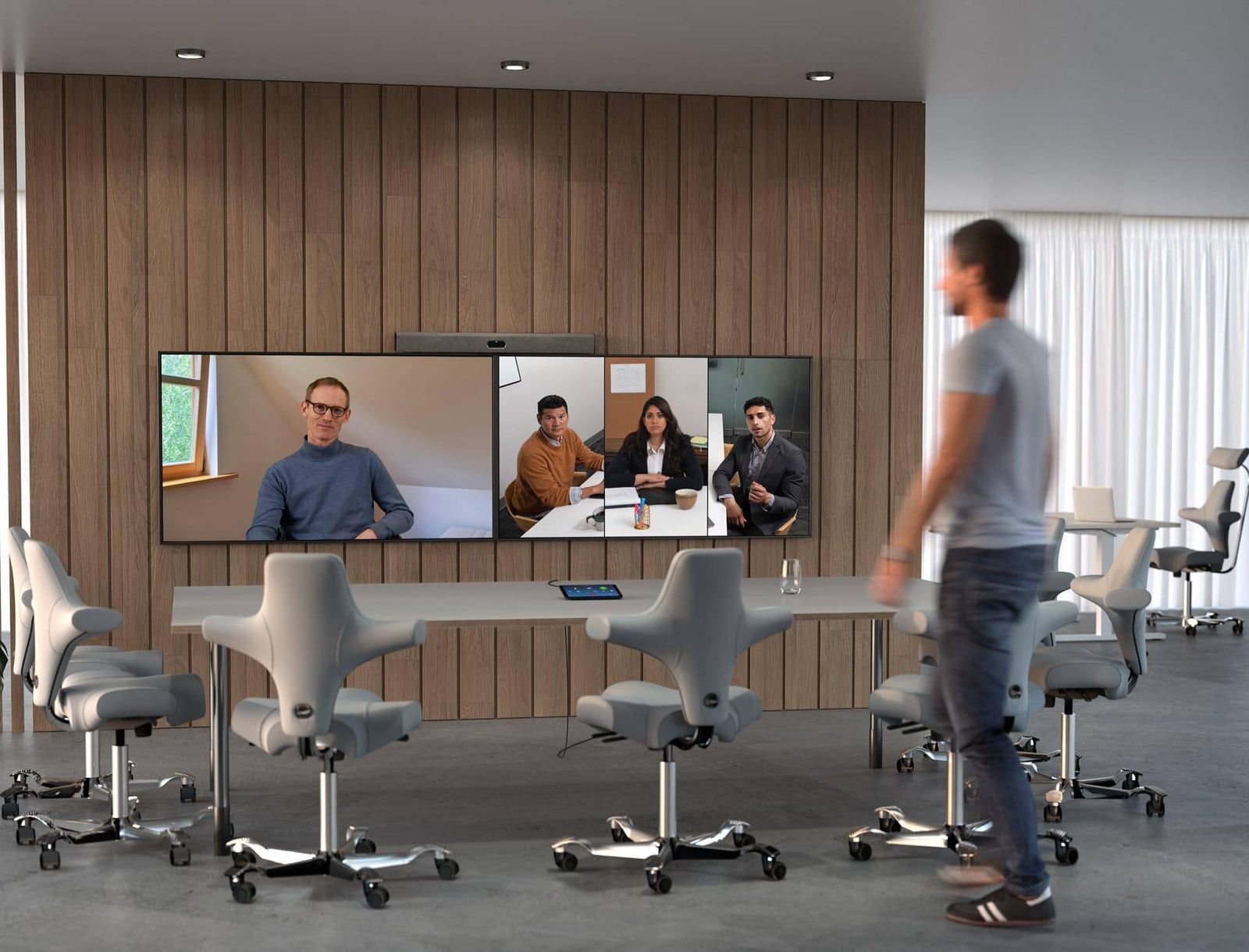
The Neat Bar Pro is an all-in-one video bar built for medium and large conference rooms, which Neat categorizes as spaces seating 14 or more people. It carries two 50MP camera sensors — a wide lens at 113 degrees horizontal field of view and a telephoto lens at 70 degrees — a 16-microphone pyramid beamforming array with a 33 ft (10 m) reach, three full-range speakers with a dual-opposing-driver subwoofer, and three HDMI outputs. It runs Zoom Rooms or Microsoft Teams Rooms on Android natively, and it requires a paired Neat Pad to operate. Neat lists it at $6,690 USD, matching the price of the Neat Bar Pro + Neat Pad bundle on our store. This guide covers the specifications that matter when you are deciding between it and the alternatives, not the unboxing experience.
What is the Neat Bar Pro, and what room size is it built for?
Neat positions the Bar Pro across "small, medium, and large spaces," but the specification that decides room fit is the 33 ft (10 m) microphone reach. That is the outer boundary of usable pickup, not a guarantee of good audio at 33 ft. In practice it maps to a table 16 to 20 ft long with the bar front-of-room — the geometry of most 12- to 20-person boardrooms.
The unit measures 35.04 in wide by 3.15 in high by 3.15 in deep (890 × 80 × 80 mm) and weighs 6.83 lb (3.1 kg). Mounting options are a table stand, a wall mount, or a screen mount, and Neat's documentation states the bar can be positioned "above or below one, two or three screens." Power is a built-in supply on 100–240V, 50/60 Hz, 1.2A, consuming 4.8W idle and 12–17W in call. There is no PoE option on the bar — plan a standard AC receptacle behind the display. Video output is up to 1080p/30 for people and up to 4K/30 for content, across three HDMI outputs.
Which platforms does the Neat Bar Pro run — Zoom Rooms or Microsoft Teams?
Both, and the choice changes what the hardware can do. Neat's product page lists "native support for Zoom Rooms" and "native support for Microsoft Teams Rooms on Android," delivered through the included Neat Pad. Google Meet is also supported. Neat states that its devices "are certified for Microsoft Teams" and separately that they "are certified for Zoom," so a Bar Pro room is a certified deployment on either platform. You pick one platform per device and change it later through Neat Pulse.
The one hardware capability that is platform-dependent is triple screen. The bar has three HDMI outputs, but Neat's specification page carries this caveat: "Google Meet and Microsoft Teams do not yet support three screens." If your boardroom design calls for three displays — far end, near end, and content — that design only works on Zoom Rooms today. On Teams you are building a two-screen room regardless of the third output being physically present. Confirm this with the customer before the display wall is fabricated.
If Teams is the requirement and you want one ultrawide front-of-room canvas rather than two panels, the answer is a single wide display, not a third HDMI output. A MaxHub UW105NA 105-inch ultra wide commercial display gives you the far-end and content side by side on one panel, which keeps the room inside what Teams actually supports.
How does Neat Symmetry differ from a fixed wide camera?
A fixed wide camera sends one frame of the whole room. Everyone at the far end sees the same image, and the people furthest from the lens are the smallest objects in it. Neat's description of the problem is direct: with conventional framing, "the room's surroundings, walls, ceiling, office furniture, etc., engulf most of the image on people's screens."
Neat describes Symmetry as combining "advanced AI with a high-resolution sensor to detect everyone in the meeting room," then it "separately auto frames each person, wherever they sit or stand, by zooming in on those at the back and showing them in equal proportion to their teammates at the front." The system also "instinctively follow[s] them if they shift positions, get up or move around."
The distinction from speaker-tracking systems is that Symmetry does not wait for someone to talk. Neat contrasts it with voice-tracking approaches by "enabling everyone in the room to be seen, regardless of who's speaking." In a boardroom where one person dominates the airtime, speaker tracking effectively hides the other eleven people.
The optical budget is why the Bar Pro can do this. Two 50MP sensors — the wide lens at ƒ/2.8 and 113 degrees horizontal, the telephoto at ƒ/1.8 and 70 degrees — combine into 16x hybrid zoom. Cropping into a 50MP frame to isolate one person at the back of a 20 ft room still leaves enough pixels to fill a 1080p tile.
What does the Neat Bar Pro's microphone array actually cover?
The array is 16 microphones in a pyramid beamforming configuration, with four dedicated tracking mics, and Neat lists 3D beamforming, voice tracking, echo cancellation, noise suppression, and dereverberation in the processing chain. Rated reach is 33 ft (10 m).
Beamforming buys you rejection of off-axis noise. It does not buy rejection of reverberation, because reverberant energy arrives from every direction, including the talker's. Before committing to any front-of-room bar in a room over about 400 sq ft, get the reverberation time under control — acoustic ceiling tile, fabric-wrapped panels on the two parallel hard surfaces, and something on the glass. This is not a Neat limitation; it applies equally to the Poly and Logitech bars below.
The second condition is distance-to-talker uniformity. A front-of-room array is a point source at one end of the table. The person nearest the bar is 4 ft away and the person at the far end is 18 ft away, so the direct-to-reverberant ratio differs sharply. AGC narrows the gap; it does not close it.
Installation note an estimator will otherwise miss: the Bar Pro cannot run Teams or Zoom natively without a paired Neat Pad, and the Pad is powered differently from the bar. Neat specifies it as "Power over Ethernet (PoE): 802.3af PoE (Class 0/mode A)," drawing 5.6W in call. So one Bar Pro room needs one 120V receptacle behind the display and one 802.3af PoE switch port — Class 0, mode A — terminated at the table box or wall location where the Pad lives. Two infrastructure items, two trades. Budget a switch port rather than an injector if the room will ever add a second Pad outside the door for scheduling.
Neat Sense and Neat Pulse: what facilities gets that AV does not
The sensor package is branded Neat Sense — an "advanced set of smart room sensor technologies designed to continuously monitor and manage environmental and occupancy conditions," in Neat's words. In a Bar Pro room the data comes from both devices: the bar contributes people count via a depth sensor, and Neat's documentation states that "Neat Pad provides the real-time sensors for air quality, temperature and humidity." The published tolerances are specific enough to be useful to a facilities engineer:
| Metric | Range | Published accuracy |
|---|---|---|
| CO2eq | 400–60,000 ppm | ±15% |
| VOC | 0–60,000 ppb | ±15% |
| VOC Index | 1–500 (indexed against past 24h) | Not published |
| Relative humidity | — | ±3.5% rH in the 20%–80% range |
| Temperature | — | ±1°C within +15°C to +40°C |
| People count | Integer | "Updates in max 10s when a change is detected" |
| Ambient light | Lux | Not published |
Neat states that "sensor data is sampled on each Neat device every second and pushed to the Neat Pulse cloud every 5 minutes," and that "devices must be powered on for at least 24 hours to provide reliable readings." That last line matters for commissioning — do not sign off on sensor data the day of installation.
This is the part of the business case the AV team usually undersells. An AV manager buys the Bar Pro for the camera. A facilities or real estate team looking at a portfolio of rooms gets per-room occupancy counts and CO2 trends without deploying a separate sensor network — a space-utilization argument, not an AV argument. Neat Pulse is where both teams meet: device inventory, health status, bulk firmware updates, restarts and log retrieval, configuration profiles, remote control, and a web API for the sensor data. Tiers run Starter (no cost), Plus (API access, SAML SSO, scheduled updates, SLA-backed support), and Pro (adds one to five years extended warranty and advanced hardware replacement). API access requires Plus or Pro — confirm before quoting.
Neat Bar Pro vs Poly Studio X70 vs Logitech Rally Bar
All of these are all-in-one bars certified for Teams and Zoom. They diverge on camera architecture, audio reach, and display output.
| Specification | Neat Bar Pro | Poly Studio X70 | Poly Studio X52 | Logitech Rally Bar |
|---|---|---|---|---|
| Stated room size | Small/medium/large, 14+ people | Large; 30 ft × 20 ft | Mid-size; 20 ft × 15 ft | Medium to large |
| Cameras | 2 × 50MP (wide ƒ/2.8, tele ƒ/1.8) | Dual 4K | Single 20MP 4K UHD | 4K motorized PTZ |
| Horizontal FOV | 113° wide / 70° tele | 120° / 70° | 95° | 82.1° H (90° diagonal); 174° diagonal AI Viewfinder |
| Zoom | 16x hybrid | Not published on product page | Not published on product page | 15X HD (5X optical, 3X digital) |
| Pan / tilt | Electronic (no motors) | Electronic (no motors) | Electronic (no motors) | Motorized ±25° / ±15° |
| Microphones | 16-mic pyramid beamforming array + 4 tracking mics | Gradient microphone array | Array; expansion mics available | 6 beamforming |
| Mic pickup | 33 ft / 10 m | Up to 25 ft / 7.6 m | Up to 20 ft / 6.09 m | Up to 23 ft / 7 m |
| Speakers | 3 full-range + subwoofer (two opposing drivers) | Two-way stereo with bass ports | Stereo | 2 × 70 mm, 8W, up to 99 dB SPL |
| Displays | 3 × HDMI out, 4K capable (3 screens Zoom only) | 2 | 2 (3 in Zoom with adapter) | 2 HDMI, up to 1080p60 (3 via USB DisplayLink) |
| Framing tech | Neat Symmetry | Poly DirectorAI (group, speaker, people) | Poly DirectorAI | RightSight, RightLight, RightSound |
| Privacy shutter | Not published | Motorized privacy shutter | Not published | Not published |
| Power | 100–240V internal PSU; 4.8W idle, 12–17W in call | Not published on product page | Not published on product page | 100–240V external PSU (19V, 4.74A); 57 BTU/hr idle, 64 BTU/hr in meeting |
| Dimensions | 35.04 × 3.15 × 3.15 in | Not published on product page | Not published on product page | 35.83 × 6.46 × 5.14 in |
| Weight | 6.83 lb (3.1 kg) | Not published on product page | Not published on product page | 15.61 lb (7.08 kg) |
| Management | Neat Pulse | Poly Lens | Poly Lens | Logitech Sync |
| Room license | Included platform app; Neat Pad required | Built-in apps | Built-in apps | "Room solution software license (not included)" |
Three lines drive most decisions. Display output: the Bar Pro's three HDMI outputs are 4K capable, while the Rally Bar's two are rated up to 1080p — a real difference if the customer bought 4K panels. Camera type: the Logitech Rally Bar with Tap IP for Microsoft Teams Rooms is the only one of the four with motorized pan and tilt, so it can physically aim rather than crop, an advantage in oddly shaped rooms at the cost of moving parts. Mounting mass: 6.83 lb versus 15.61 lb changes what backing you need behind drywall. Full Poly Studio X series and Logitech room system configurations are on our store, alongside the rest of our Neat conferencing hardware.
When an all-in-one bar is the wrong answer
An integrated bar puts the camera, microphones, DSP, and codec in one enclosure at one location. That is the right trade when the room is a rectangle, the table is under about 18 ft, the ceiling is under about 10 ft, and there is one clear front-of-room. Move away from any of those and the single-location assumption starts to cost you.
Go to a discrete camera, DSP, and ceiling microphones when: the table exceeds roughly 20 ft or the room seats more than about 20; the room is L-shaped, has a divider wall, or has more than one presentation position; the ceiling is high enough that a front-of-room array picks up more reverberant than direct sound; the client needs Dante or AES67 for an overflow room, a lectern mic, or a council-chamber recording feed; or the room needs a control processor doing more than a meeting join — shades, lighting scenes, a matrix switcher, source routing.
In that build the pickup moves overhead and the processing moves to a rack. A Shure MXA925W-S ceiling array microphone drops flush into the tile grid directly above the table, so every seat is roughly the same distance from a mic instead of 4 ft at one end and 18 ft at the other. On the control and DSP side, a QSC Core Nano Q-SYS processor handles the mixing, echo cancellation, and the Dante or AES67 legs an integrated bar has no way to give you, and it is the same box you use to drive shades, lighting scenes, and source routing.
The signal to watch for is a customer describing more than one thing the room has to do. A room that hosts a board meeting Monday, a training class Tuesday, and a public hearing Wednesday wants separated components. Our meeting room bundles span both approaches.
FAQ
Is the Neat Bar Pro certified for Microsoft Teams?
Yes. Neat states that "Neat devices are certified for Microsoft Teams," and the Bar Pro runs Microsoft Teams Rooms on Android natively. It is separately certified for Zoom. The functional difference is triple screen: Neat notes that "Google Meet and Microsoft Teams do not yet support three screens," so the third HDMI output is only usable on Zoom Rooms today.
How large a room can the Neat Bar Pro cover?
Neat rates the microphone array at 33 ft (10 m) and lists the device for small, medium, and large spaces in the 14-plus person category. Treat 33 ft as the outer limit, not the design target. Tables up to roughly 16 to 20 ft are the reliable case; beyond that, plan on ceiling microphones and a separate DSP.
Does the Neat Bar Pro need a Neat Pad?
Yes. Neat states that a Neat Pad "is required to control your meetings" when running Teams or Zoom natively. The Pad also carries the temperature, humidity, CO2 and VOC sensors for the room.
Does the Neat Bar Pro support PoE?
No. The bar has a built-in power supply on 100–240V, 50/60 Hz, 1.2A, consuming 4.8W idle and 12–17W in call. Only the Neat Pad is PoE-powered, at 802.3af Class 0 mode A and 5.6W — so the room needs a PoE switch port in addition to the AC receptacle for the bar.
What does Neat Sense measure?
CO2eq (400–60,000 ppm, ±15%), VOC (0–60,000 ppb, ±15%), a VOC Index on a 1–500 scale, relative humidity (±3.5% rH between 20% and 80%), temperature (±1°C from +15°C to +40°C), ambient light in lux, and people count. Neat notes that "devices must be powered on for at least 24 hours to provide reliable readings."
Neat Bar Pro or Logitech Rally Bar for a boardroom?
Pick the Bar Pro for 4K output to multiple displays, per-person framing across a full table, and the longer published microphone reach (33 ft versus 23 ft). Pick the Rally Bar when the room shape needs a camera that physically aims — it has motorized pan and tilt at ±25 and ±15 degrees. The Rally Bar also requires a room solution software license that is not included.
What to do next
If the room is a rectangle under about 20 ft with one front-of-room and the platform already decided, the Neat Bar Pro is a defensible specification, and the Neat Bar Pro + Neat Pad bundle covers everything the room needs to run. If the room is larger, oddly shaped, or has to do more than one job, send us the floor plan and ceiling type and we will scope the discrete alternative against it.
Call 1.888.230.3661 and ask for a design review. We ship to CA, NV, AZ, OR and WA.


