

Televic CoCon Signage - 71.98.1102
Software License
Televic CoCon Signage - 71.98.1102 is backordered and will ship as soon as it is back in stock.
Shipping Availability*
Shipping Availability*
Free Ground Shipping on Most Orders Over $250.00
Looking for the best price or expert advice? Give us a call at 1-888-230-3661 or use the Live Chat below. Buying 1 or 100, you may qualify for greater savings beyond the advertised price.

Televic CoCon Signage - 71.98.1102
Product Overview
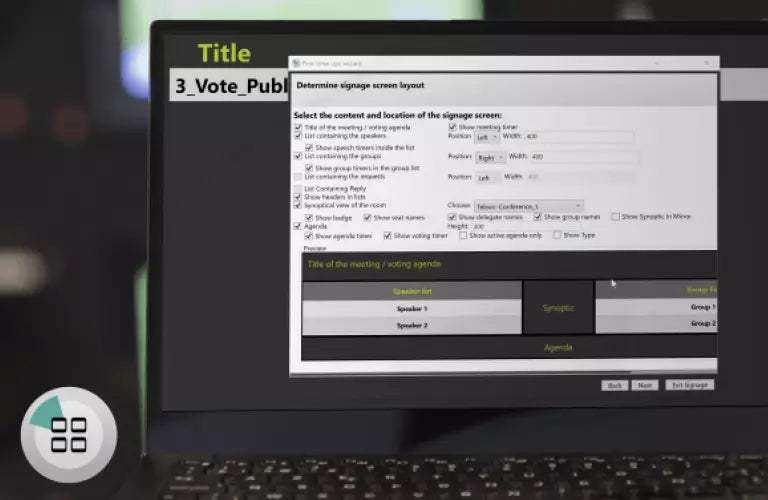
CoCon Signage is a display software module within the CoCon Conference Control Suite that broadcasts live meeting information to external screens or projectors within the conference room. It displays meeting title, meeting timer, speaker list, voting results, agenda items, and other real-time meeting data through configurable screen templates—keeping all participants informed of the meeting status without requiring access to the CoCon operator interface. CoCon Signage requires CoCon Discussion as a prerequisite and typically runs on a second dedicated PC driving the signage displays. For rooms requiring both voting and signage, the CoCon Meeting Suite bundle (71.98.1150) provides a more cost-effective licensing path.
Product Description

CoCon Signage operates as an add-on to CoCon Discussion, pulling live meeting data from the CoCon system and displaying it on external screens through configurable templates. Meeting administrators pre-configure screen layouts and event rules—defining which content displays during specific meeting states (e.g., meeting paused, voting in progress, voting concluded). During the session, the signage application updates automatically as meeting events occur: when a delegate requests the floor, their name appears on the speaker list; when a vote concludes, results are displayed with configurable color-coded bars matching the voting option colors. Signage can run on the same PC as CoCon Core or on a dedicated secondary PC, depending on the display infrastructure of the installation.
Key Features
- Real-Time Meeting Display — Broadcasts meeting title, timer, speaker list, agenda, and voting results to external screens automatically.
- Configurable Screen Templates — Pre-defined templates control what information appears during each meeting state (active session, voting, pause, etc.).
- Voting Results Display — Voting results shown with color-coded bars matching the voting option colors configured in CoCon Voting.
- Speaker List and Queue — Active speaker and request-to-speak queue displayed in real time for all participants to see.
- Requires CoCon Discussion — CoCon Discussion (71.98.1101) is a required prerequisite.
- Part of Meeting Suite Bundle — Also available as part of the CoCon Meeting Suite (71.98.1150) with Discussion and Voting.
Typical Applications
- Government space
- Boardroom
- Conference room
- Multi-purpose room
Technical Specifications
| Specification | Detail |
|---|---|
| License Type | CoCon software module |
| Prerequisite | CoCon Discussion (71.98.1101) |
| Display | External screens or projectors |
| PC Requirement | Same or dedicated secondary Windows PC |
| Part Number | 71.98.1102 |
Frequently Asked Questions
Is CoCon Discussion required?
Yes. CoCon Signage is an add-on to CoCon Discussion (71.98.1101).
Should I buy CoCon Signage separately or as part of the Meeting Suite?
If the installation also requires Voting, the CoCon Meeting Suite (71.98.1150) bundles Discussion, Voting, and Signage at a lower combined cost. Purchase Signage independently only when Voting is not required.
Does CoCon Signage require a dedicated PC?
Signage can run on the same PC as CoCon Core or on a dedicated secondary PC. A dedicated PC is recommended when the signage display output is managed separately from the operator's CoCon station.
At Creartion Networks, we do everything we can to create an excellent customer experience. This includes fast shipping and easy returns.
- Most in-stock orders placed Monday-Friday ship within 24-48 hours. General restrictions apply; please see our full shipping policy here.
- We offer a 30-day return policy from the delivery date on many products. Product restrictions apply. Restocking fees for the return of open-box items. Please see our full return policy here for more information.
Nationwide Audiovisual Services, Design, Installation & Support
Creation Networks is a trusted nationwide partner for complete audiovisual solutions — delivering expert AV system sales, professional design, programming, installation, and ongoing support to organizations across the United States.
From Microsoft Teams Rooms and enterprise video conferencing to LED video walls, live streaming production, and hybrid collaboration systems, we provide end-to-end AV integration using premium, certified technology from industry leaders including Crestron, Q-SYS, Shure, Extron, and Absen.
Whether you operate a single location or manage facilities nationwide, Creation Networks ensures your AV systems are designed for reliability, scalability, security, and long-term performance — helping your organization communicate more effectively and operate at peak efficiency.
CREATION NETWORKS — A PARTNER YOU CAN TRUST SINCE 2006


