
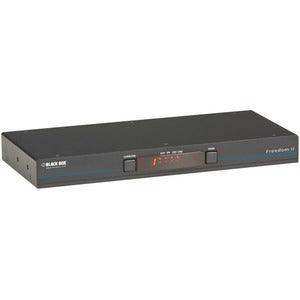

Black Box KV0004A-R2 – Freedom II 4-Port KM Glide-and-Switch
Black Box KV0004A-R2 – Freedom II 4-Port KM Glide-and-Switch is backordered and will ship as soon as it is back in stock.
Shipping Availability*
Shipping Availability*
Free Ground Shipping on Most Orders Over $250.00
Looking for the best price or expert advice? Give us a call at 1-888-230-3661 or use the Live Chat below. Buying 1 or 100, you may qualify for greater savings beyond the advertised price.

Black Box KV0004A-R2 – Freedom II 4-Port KM Glide-and-Switch
Product Overview
The Black Box KV0004A-R2 is the Freedom II 4-port KM (keyboard and mouse) Glide and Switch, allowing a single operator to control up to four computers using one keyboard and mouse by moving the cursor across display boundaries — no hotkey switching required. Designed for multi-computer workstations in operations centers, trading floors, broadcast production suites, and enterprise IT environments, the KV0004A-R2 supports cursor-glide switching across up to four independent desktop systems. The R2 revision delivers improved compatibility and reliability over its predecessor, making it the current recommended platform for Freedom II KM switch deployments.
Product Description

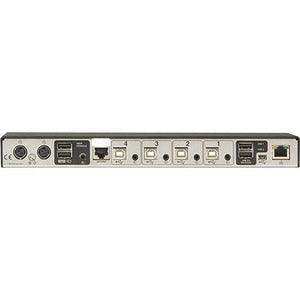
The KV0004A-R2 belongs to Black Box's Freedom II KM Switch family, a product line engineered specifically for operators who need continuous, low-friction access to multiple computers without the cognitive overhead of hotkey sequences or physical peripheral re-patching. The Glide and Switch mechanism detects the cursor reaching the defined edge of one display and automatically transfers keyboard and mouse control to the adjacent computer — the transition is instantaneous and transparent. With support for up to four connected computers, the KV0004A-R2 is suited for broadcast production positions where an operator monitors and controls multiple systems simultaneously, trading workstations with adjacent market data and order management computers, or IT support desks managing multiple server consoles. The R2 hardware revision improves USB peripheral compatibility and overall system stability compared to the original KV0004A. The KM switch handles keyboard and mouse signals only — each computer drives its own dedicated display — meaning there is no signal processing on the video path and no video quality compromise. USB keyboard and mouse inputs are transparently shared, and each computer maintains its own independent display, giving operators the benefit of a true multi-monitor, multi-computer environment. Installation is straightforward: connect each target computer's USB keyboard and mouse ports to the KV0004A-R2 using standard USB cables, and configure the cursor-edge trigger zones via the included software. No special cabling or rack infrastructure is required. The KV0004A-R2 works independently of any IP network, making it suitable for air-gapped or high-security environments. For larger deployments or installations requiring video switching in addition to KM, Creation Networks offers the full Black Box KVM switch and extender portfolio at creationnetworks.net.
Key Features
- 4-Computer KM Control — Control up to four independent computers with a single keyboard and mouse from one workstation.
- Cursor Glide Switching — Move the mouse cursor to the screen edge to switch control to the adjacent computer — no hotkeys required.
- KM-Only (No Video Switching) — Each computer drives its own dedicated display; video quality is completely unaffected by the switch.
- R2 Hardware Revision — Improved USB peripheral compatibility and system stability over the original KV0004A release.
- USB Keyboard and Mouse Support — Standard USB connections to each host computer; no proprietary cables required.
- Network-Independent Operation — Functions without IP network connectivity; suitable for air-gapped or security-sensitive environments.
- Easy Software Configuration — Included software utility configures cursor-edge trigger positions and screen layout to match physical display arrangement.
- Compact Desktop Form Factor — Small footprint unit sits on the desktop or can be placed in a rack or under-desk location.
Typical Applications
- Boardroom
- Government space
- Broadcast studio
- Conference room
- Training room
- Commercial meeting space
Technical Specifications
| Specification | Value |
|---|---|
| Model | KV0004A-R2 |
| Platform | Freedom II KM Glide and Switch |
| Number of Computers | 4 |
| Switching Method | Cursor glide to screen edge (mouse switching) |
| Peripheral Signals Switched | Keyboard and mouse only (KM — no video switching) |
| Computer Interface | USB (keyboard and mouse ports) |
| Video Handling | None — each computer drives its own display independently |
| Network Requirement | None — operates independently of IP network |
| Hardware Revision | R2 |
| Form Factor | Desktop unit |
Frequently Asked Questions
Does the KV0004A-R2 switch video signals as well as keyboard and mouse?
No. The KV0004A-R2 is a KM (keyboard and mouse) switch only. Each connected computer drives its own dedicated display independently, with no video signal routed through the switch. This is intentional — it means each computer's video output goes directly to its display without any quality processing or delay.
How does cursor glide switching work in practice?
The included software defines screen edge trigger zones. When the mouse cursor reaches the configured edge of the active computer's display area, control transfers automatically to the adjacent computer. The transition is instantaneous from the operator's perspective.
Can I use any USB keyboard and mouse with the KV0004A-R2?
Yes. The R2 revision offers improved compatibility with a wide range of USB keyboards and mice, including gaming mice with higher polling rates. Standard USB HID-class peripherals are fully supported.
Does the KV0004A-R2 require an IP network connection to operate?
No. The KV0004A-R2 operates entirely independently of any network infrastructure. This makes it suitable for air-gapped environments, secure government facilities, and locations where network connectivity to the switch unit is not desired.
What is the difference between the KV0004A and the KV0004A-R2?
The R2 is a revised hardware version with improved USB peripheral compatibility and system stability. If replacing an original KV0004A, the R2 is a direct upgrade and uses the same cable connections.
Can I upgrade to more than 4 computers using multiple KV0004A-R2 units?
For deployments requiring control of more than four computers, Black Box offers larger Freedom II KM switch models and full KVM matrix switching solutions. Contact Creation Networks to discuss multi-computer control configurations for your specific environment.
At Creartion Networks, we do everything we can to create an excellent customer experience. This includes fast shipping and easy returns.
- Most in-stock orders placed Monday-Friday ship within 24-48 hours. General restrictions apply; please see our full shipping policy here.
- We offer a 30-day return policy from the delivery date on many products. Product restrictions apply. Restocking fees for the return of open-box items. Please see our full return policy here for more information.
Nationwide Audiovisual Services, Design, Installation & Support
Creation Networks is a trusted nationwide partner for complete audiovisual solutions — delivering expert AV system sales, professional design, programming, installation, and ongoing support to organizations across the United States.
From Microsoft Teams Rooms and enterprise video conferencing to LED video walls, live streaming production, and hybrid collaboration systems, we provide end-to-end AV integration using premium, certified technology from industry leaders including Crestron, Q-SYS, Shure, Extron, and Absen.
Whether you operate a single location or manage facilities nationwide, Creation Networks ensures your AV systems are designed for reliability, scalability, security, and long-term performance — helping your organization communicate more effectively and operate at peak efficiency.
CREATION NETWORKS — A PARTNER YOU CAN TRUST SINCE 2006


